

Download Grammar Checker & Corrector – Real-Time Grammar, Spelling, and Style Improvements
Overview
Grammar Checker & Corrector is a mobile application designed to enhance written communication across a broad spectrum of users. Its primary purpose is to identify and correct grammar, punctuation, and spelling errors in real time, ensuring that users can produce clear, professional, and error-free content. This tool is particularly beneficial for students drafting essays, professionals composing emails or reports, and non-native speakers aiming to improve their language proficiency. By leveraging advanced AI technology, the app provides context-aware corrections and actionable suggestions that go beyond basic spell-checking.
The application supports multiple languages, making it accessible to a global audience and fostering inclusive communication. Users can track their writing progress over time through the built-in history tracking feature, which helps reinforce learning by highlighting recurring mistakes and improvements. This functionality transforms the app from a simple correction tool into a long-term writing development companion. Although the developer did not provide additional technical details, the app’s focus on real-time feedback and user growth suggests a strong commitment to usability and educational value.
Within the mobile app ecosystem, Grammar Checker & Corrector fills a critical gap for users seeking reliable, free, and accessible writing assistance. It stands out by combining immediate error detection with progressive learning tools, positioning itself as a practical utility for daily communication on smartphones and tablets.
Key Features & Functionality
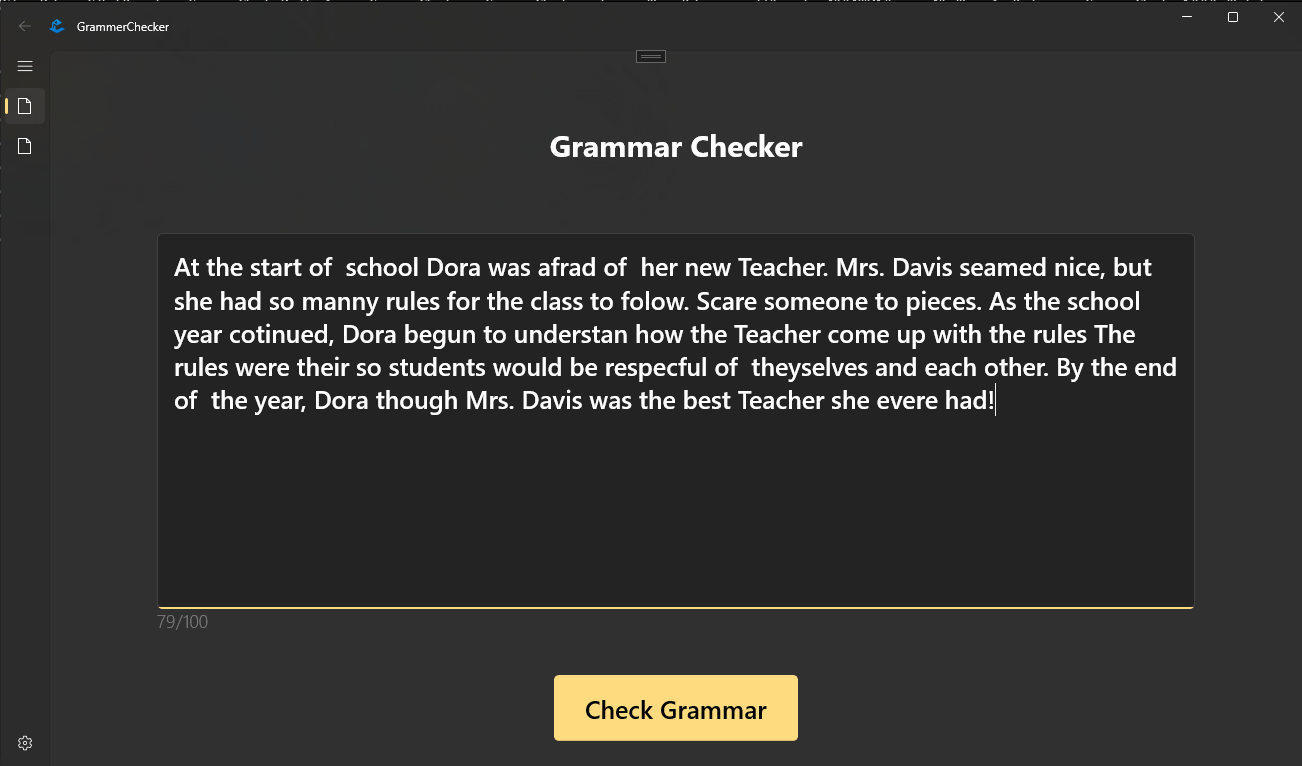
- Real-Time Corrections: Instantly detects grammar, punctuation, and spelling mistakes as you type, offering immediate fixes. This is ideal for urgent writing tasks such as drafting emails or submitting assignments under time pressure.
- AI-Powered Suggestions: Analyzes context to recommend stylistic improvements, enhancing clarity, tone, and readability. For example, it can suggest replacing passive voice with active constructions for stronger impact.
- Multi-Language Support: Enables users to write in various languages and receive accurate corrections, making it a valuable tool for multilingual individuals and international users.
- History Tracking: Stores past writing samples and corrections, allowing users to review their progress and identify patterns in recurring errors, supporting long-term skill development.
- User-Friendly Experience: Features an intuitive, ad-free interface that prioritizes focus and ease of use. The clean layout ensures minimal distractions, enabling users to concentrate on writing quality.
These features collectively address common writing challenges such as unintentional grammatical errors, inconsistent tone, and lack of feedback. For students, the history feature supports self-assessment and learning. Professionals benefit from polished, error-free documents that reflect attention to detail. The app’s free access model removes financial barriers, encouraging widespread adoption across different user groups.
Interface, UX & Performance
The interface of Grammar Checker & Corrector is designed with simplicity and efficiency in mind. The layout prioritizes text input and correction display, minimizing clutter and ensuring users can focus on their writing. Visual feedback for errors is clear and immediate, often highlighted in real time with color-coded indicators or underlines. Navigation is straightforward, with minimal taps required to access features such as history or language settings.
Although the developer did not list formal performance metrics, the app’s real-time correction capability suggests optimized background processing and low latency. It is expected to function smoothly on a range of device categories, including mid-tier and high-end smartphones and tablets. Responsiveness is likely consistent across screen sizes, though specific compatibility details were not disclosed. Stability appears to be a priority, given the absence of ads and the focus on uninterrupted writing sessions.
Users can expect a seamless experience when typing, with minimal lag or crashes. The app’s performance is likely tuned for everyday use, supporting both quick checks and extended writing sessions. The absence of intrusive notifications or monetization elements further enhances the user experience, allowing for uninterrupted focus on content creation.
Platform Compatibility & Technical Requirements
Grammar Checker & Corrector is available on Android and iOS platforms. The app supports the latest versions of both operating systems, ensuring compatibility with current device models. The file size is reported as 12.5 MB, which indicates a lightweight installation that does not strain device storage. This makes it suitable for users with limited space or older devices.
Specific requirements such as minimum OS version, processor, or RAM were not listed by the developer. The developer did not specify minimum OS requirements. Users should ensure their device meets general system standards for running modern mobile applications. No additional permissions or hardware dependencies were mentioned, suggesting a standard access model focused on text input and processing.
Pros and Cons
Pros
- Free to use with no hidden subscriptions or in-app purchases
- Real-time grammar and spelling corrections enhance writing quality instantly
- Supports multiple languages, broadening accessibility for global users
- History tracking helps users monitor and improve their writing over time
- Intuitive, ad-free interface promotes focus and ease of use
Cons
- Specific performance benchmarks or device compatibility details were not provided
- Advanced features may be limited without additional context or customization options
- Developer did not list detailed technical specifications or system requirements
- Exact update frequency or release cycle was not disclosed
- Language-specific AI training data details were not shared
FAQ
Is Grammar Checker & Corrector safe to use?
The app does not require sensitive permissions and operates primarily on local text input. No data is reported to third parties unless explicitly stated. Users are advised to review the privacy policy for full transparency.
Can I use this app offline?
While the developer did not specify offline functionality, real-time corrections typically require internet access for AI processing. Offline use may be limited to basic spell-checking, if available.
How often is the app updated?
The developer did not disclose the update schedule. Users should check their app store for the latest version and release notes.
Is the app available on both Android and iOS?
Yes, Grammar Checker & Corrector is designed for both Android and iOS platforms, ensuring broad accessibility across mobile devices.
Does the app support my language?
The app supports multiple languages, though the exact list was not provided. Users can test the app with their preferred language to verify compatibility.
Final Thoughts
Grammar Checker & Corrector delivers a compelling blend of functionality, accessibility, and educational value. Its real-time corrections, multi-language support, and history tracking make it a powerful tool for anyone aiming to refine their writing. The free, ad-free model removes common barriers to entry, while the intuitive interface ensures a smooth experience across different user types.
Students, professionals, and non-native speakers alike can benefit from its intelligent suggestions and progress tracking. The app stands out in the crowded mobile utility space by combining immediate correction with long-term skill development. For users seeking a reliable, secure, and efficient way to improve their written communication, Grammar Checker & Corrector is a top-tier choice.
Download Grammar Checker & Corrector now


